How to live stream a cricket tournament, every match, every ground
A local tournament is not one stream. It is 6 to 30 matches over a weekend, often on two grounds at once, with players' families watching from home. This guide covers the setup that works at that scale: one phone per ground, a scorer per match, and a score strip on every broadcast, all from the CricLogs Android app.
The short answer
- Create the tournament in CricLogs with teams, squads and fixtures, so every match is ready to score and stream.
- Put one phone on a tripod behind the keeper on each ground, with its own SIM or ground Wi-Fi, a power bank and shade.
- Give each match a scorer. The scorer can be on a different phone from the camera; the score strip follows the scoring.
- Go Live from each match to the tournament's YouTube channel, the CricLogs channel, or any RTMP destination.
- Share each live link and the tournament page, so viewers can follow scores, the points table and leaderboards.
Plan the broadcast a week before
Most tournament streams that fail do so before the first ball, because nobody worked out how many cameras, people and gigabytes a full day needs. Answer four questions first.
| Question | Why it matters | Typical answer for a local tournament |
|---|---|---|
| How many grounds play at once? | Each ground playing at the same time needs its own camera phone and its own connection. | 1–2 grounds; a third only if you have the people. |
| Who scores each match? | The score strip only knows what the scorer enters. A late scorer means a wrong score on screen. | One scorer per match, rostered by team, usually the batting side's twelfth player. |
| Which YouTube channel? | A club or tournament channel keeps every video in one place and grows subscribers. The CricLogs channel needs no setup. | Tournament channel if it is verified a day in advance; otherwise the CricLogs channel. |
| Public or unlisted? | Public streams can be found in YouTube search; unlisted ones are seen only by people with the link. | Public for open tournaments; unlisted for school and corporate events. |
If you use your own YouTube channel, verify it with a phone number and enable live streaming at least 24 hours before the first match. First-time activation can take that long. The YouTube live requirements guide has the full checklist.
Set up the tournament in CricLogs
Streaming is easier when the tournament already exists in the app: team names, squads and fixtures then appear on the score strip without anyone typing them on match day.
- Create the tournament with its name, dates, venue and format (box cricket, tennis ball, leather ball, T20 and so on).
- Add the teams and squads. Correct player names mean the striker, non-striker and bowler show correctly on the stream.
- Add the fixtures so each scorer opens the right match instead of creating a duplicate.
- Add scorers and admins so whoever is at each ground can start scoring and go live.
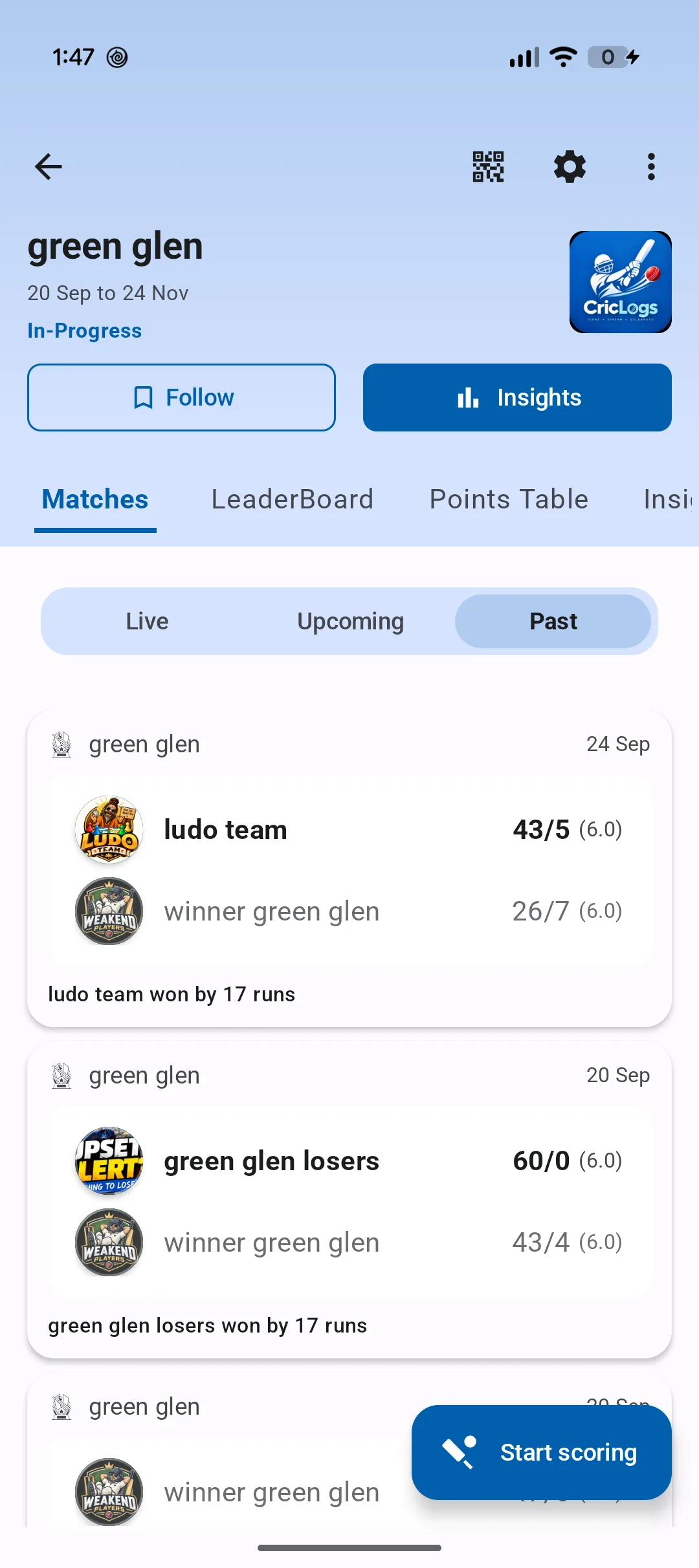
The step-by-step version with screenshots is in how to create a local tournament, and the organiser features are on the tournament app page.
Stream each match in five steps
On match day, repeat this for every fixture. It takes about two minutes once the camera is on the tripod.
-
1
Open the fixture in the tournament
Open the tournament in CricLogs, pick today's fixture and start the match: toss, playing XIs, overs. The score strip pulls team names and squads from here.
-
2
Tap Go Live on the match screen
From the match screen, open the Go Live tab. Any scorer or admin of the tournament can start the broadcast.
-
3
Choose where it goes
Pick the tournament's own YouTube channel, the CricLogs YouTube channel (no setup), or a custom RTMP URL and stream key for another platform.
-
4
Set quality and the score strip
Choose resolution and frame rate for the ground's connection, landscape or portrait, a title and thumbnail, then the score strip theme or team colours with the tournament branding.
-
5
Start streaming and share the link
Tap Start Streaming and share the YouTube link in the team and tournament WhatsApp groups. Every ball the scorer enters updates the score strip on the stream.
The camera phone stays locked on the tripod behind the keeper. The scorer can sit in the shade with a second phone. Both are signed in to the same match, and the score strip on the stream updates from the scorer's entries.
Streaming two or more grounds at the same time
Each match is its own YouTube live video with its own link. Two grounds playing at once means two camera phones, two connections and two live links running side by side.
- One connection per ground. Never share one hotspot between two streaming phones; each needs its own SIM or a Wi-Fi network with enough upload for both.
- Name streams clearly. Put the ground and match number in the title, for example Ground 2 · Match 7 · Lions vs Tigers, so viewers open the right one.
- Pin a link list. Before each round, post one message in the tournament group with every live link, and update it when matches start.
- Keep a spare phone charged. A dead or overheated phone on one ground should not end that ground's coverage for the day.
Branding, sponsors and the points table
Streams are what local sponsors pay for, so make the branding work for them.
- Tournament branding on the score strip. The strip can show the tournament name and logo and sponsor logos alongside teams, score, overs, batters and bowler.
- Team colours. Match the strip to the teams' real jersey colours so viewers can tell at a glance who is batting.
- Points table and leaderboards. Share the tournament page with the live link. Fans who join late can see standings and top run-scorers and wicket-takers without asking in the group.
- Thumbnails. A clear thumbnail with team names and the sponsor logo gets more clicks in WhatsApp previews. CricLogs can suggest an AI thumbnail prompt to use with ChatGPT or Gemini.
Power, data and heat for a full day
A tournament day runs 6 to 10 hours. Plan these three things per ground, not per match.
Mobile data per match
Data used is roughly the bitrate in Mbps × 0.45 = GB per hour. A T20 runs about three hours with the break.
| Stream quality | Typical bitrate | Data per hour | Data per 3-hour T20 |
|---|---|---|---|
| 720p, 30 FPS | 3–4 Mbps | 1.4–1.8 GB | 4–5.5 GB |
| 1080p, 30 FPS | 4–6 Mbps | 1.8–2.7 GB | 5.5–8 GB |
| 1080p, 60 FPS | 6–10 Mbps | 2.7–4.5 GB | 8–13.5 GB |
| 4K | 15–25 Mbps | 6.8–11 GB | 20–34 GB |
For a full day of back-to-back matches on mobile data, 1080p at 30 FPS is usually the right balance. Use a SIM with a large daily pack or unlimited data in the streaming phone, not a personal phone's hotspot.
Power and heat
- Power bank: 10,000 mAh covers one T20; carry at least 20,000 mAh per ground for a 6–10 hour day.
- Shade: direct sun causes more dropped streams than anything else. Clip an umbrella over the phone.
- Cooling: for back-to-back matches in summer, an active phone cooler keeps the frame rate steady.
- Do Not Disturb: silence calls and notifications on the streaming phone; a call at the wrong moment can drop the stream.
The full kit list with budget and full-day options is in the cricket live streaming equipment guide.
Finals and bigger productions: more cameras and OBS
For the final, many organisers want a second camera, replays or commentary. That is a job for a laptop running OBS Studio or Prism Live Studio. CricLogs still does the scoring: copy the match's overlay link from Go Live → Stream with OBS / Prism and add it as a browser source. The same live score strip then sits over whatever cameras you switch between.
See the cricket score overlay for OBS and Prism for the setup. If you want to stream to Facebook or another platform instead of YouTube, use a custom RTMP URL and stream key from the Go Live screen.
Frequently asked questions
Can I live stream a whole cricket tournament for free?
Can two matches stream at the same time?
Do I need my own YouTube channel to stream a tournament?
Can the scorer and the camera be different phones?
Can I stream a tournament to Facebook?
How much data does a tournament stream use?
Stream your next tournament from phones
Download CricLogs for Android, set up the tournament once, and go live on every match with a score strip that updates itself.
Download free on Google Play